TL;DR
I am pleased to announce the release of
filepack
0.0.10.
Filepack is a content-addressed package format, metadata standard, command-line
utility, and package server.
The filepack binary is written in Rust and can be used to create, sign, and
verify packages, and includes a package server with an attractive front end, as
well as commands to upload and download packages.
A demo server with a nice collection of packages is available at
filepack.com.
It is already featureful and useful, but the package and metadata formats are
not stable, and as yet there is no guarantee of backwards compatibility.
Lofty Ambitions
The goal of filepack is to make decentralized filesharing as appealing and easy
to use as centralized services. When you share audio, images, and video they
should look good and be easy to search and play.
Existing filesharing technologies are hard to use because they transfer
unstructured data: individual files or directories of files. With no structure
or metadata, many desirable features are hard or impossible to build. For
example, structured search, graphical user interfaces with package artwork, and
automatically locating, playing, and transcoding media.
Filepack packages include structured, machine-readable metadata describing the
package and its contents. This allows them to be presented in an attractive
way, supports structured search, and for any media in the package to be
automatically previewed and played.
All metadata displayed by the filepack.com demo server
is served directly from the metadata included in each package. This includes
package titles, artwork, image thumbnails, and video placeholder images.
Filepack metadata also identifies the media type of the package and each
individual media item, including its file format, and details like resolution,
codec, and duration.
Inscrutable Details
Filepack packages are content-addressed Merkle trees, identified by a root hash
called the package fingerprint. The inner hashes of the Merkle tree are
BLAKE3 hashes, itself a tree hash, allowing for incremental transfer and
verification. Packages may be signed using Ed25519.
Packages include both content and metadata, so a package can be downloaded with
filepack download --package FINGERPRINT and uploaded to a new server with
filepack upload --server URL.
Because filepack packages are normal directories of files, they can be shared
with other filesharing technologies, like BitTorrent, Usenet, and ordinary web
servers.
Metadata is optional, so filepack can also be used as a general purpose
directory hashing, signing, and verification tool.
Filepack includes a web package type, which can served by the filepack server
and have access to the server API. This allows creating and distributing web
apps that can access and display the packages on a server.
Exhortations
I've been slaving away for months on this thing, so I would absolutely love it,
and you, if you gave filepack a whirl.
You can download the latest release from
GitHub or build it from source
with cargo install filepack.
Try creating a package and running the server, for yourself or others.
Filepack only supports a limited number of media types and file formats, but
I'm very happy to add more if there's demand.
Please feel free to report issues or request new features on
GitHub, or just email
me.
Future Directions
The next thing I want to work on is guaranteeing backwards compatibility, or at
least understanding what needs to be done before backwards compatibility can
be guaranteed.
Filepack defines a bunch of different formats, including the manifest and
metadata file formats, Merkle tree structure, and signature scheme. I've
constantly been making backwards incompatible changes to these formats in the
process of adding features and fixing bugs. But, for filepack to be useful,
these formats must reach a point where I can guarantee that packages created by
old versions of filepack will work with future versions of filepack.
After that, I want to write comprehensive documentation, including
specifications of the data formats, explanations of the design choices, and
guides for things like how to create good packages and run a server.
And finally, after that, there are a whole bunch of things I'd like to do. In
no particular order:
-
Reach out to filesharing and archival communities, and add features that make
filepack useful for them.
-
Add more media types and file formats, and expand existing media types.
-
Add subtypes that change how media is displayed. For example, a webtoon
subtype that can be applied to image packages which causes the images to be
displayed with a continuous vertical scrolling layout.
-
Improve the web package type, and implement a single-page application media
player that can be served from the demo server.
Eventually, I'd like to create a filepack-native peer-to-peer filesharing
network, with a rich client that's much more like a media player than a
filesharing application. But that's a long way off.
Closing Remarks
Filepack is something that I've been thinking about and working on, in one form
or another, for quite a while. I'm very happy to finally be able to release
something that at least starts to articulate the vision of the project. There's
still a long way to go, but hopefully it's useful in its current form and
someone out there appreciates the ideas that it embodies.
If you do just foo, the following justfile
will write a single byte 0x0A to a file named bar:
x := "\n"

foo:
  printf '{{x}}' > bar
Let's find out where that 0x0A byte comes from.
just is written in Rust, and the just parser has a function called
cook_string, which transforms a just string token containing escape
sequences into a UTF-8 string.
The code is here
here.
With some irrelevant details elided, it looks like this:
for c in text.chars() {
  match state {
    …
    State::Backslash => {
      match c {
        'n' => cooked.push('\n'),
        …
      }
      …
    }
    …
  }
}
So just asks rustc to insert the result of evaluating the Rust '\n'
character escape. Let's take a look at how rustc handles '\n'.
rustc's escape code handling is in the lexer, in a function called
scan_escape, which is
here.
With some details removed:
let res: char = match chars.next().ok_or(EscapeError::LoneSlash)? {
    …
    'n' => '\n',
    …
};
rustc is written in Rust and compiles itself, so somehow rustc is
delegating to rustc to figure out what '\n' means, which seems odd, to say
the least, and we still haven't seen the naked 0x0A byte we're looking for.
rustc wasn't always written in Rust though. Before it was self-hosted, early
versions were written in OCaml.
GitHub has old versions of the OCaml version of rustc, which handled
character escapes in the lexer
here.
and char_escape = parse
  …
  | 'n' { end_char (Char.code '\n') lexbuf }
  …
So rustc asks the OCaml compiler to insert the result of evaluating the
OCaml character escape '\n'. Which is totally reasonable, but still not a
0x0A in sight.
Going one step deeper, let's look the OCaml lexer
here.
And finally, some clarity:
let char_for_backslash = function
    'n' -> '\010'
  …
When the OCaml compiler sees \n, it inserts the result of evaluating the
OCaml character escape \010, which is a decimal character escape, and since
0x0A is 10, we finally have our byte value.
So when have a \n character escape in your justfile, the just binary
contains a 0x0A byte in some form, which it will then write to your final
string.
That 0x0A byte was put there by rustc, which contained it's own 0x0A
byte somewhere in the binary, which was stuffed there by its rustc progenitor.
rustc is currently at version 1.81.0, so this has happened at least 81 times
since rustc 1.0 was first released, and probably many more times than that
before 1.0, with rustcs furtively smuggling 0x0A bytes from one to the
other, all the way back to when it was written in OCaml, when finally the first
0x0A byte was stuffed into a rustc binary by the OCaml compiler, which
evaluated it from a decimal character escape '\010'.
This post was inspired by another post about exactly the same thing. I
couldn't find it when I looked for it, so I wrote this. All credit to the
original author for noticing how interesting this rabbit hole is.
-
What is happening?
-
What is a hypothesis that would explain why this is happening?
-
How can you test this hypothesis?
-
Test it! What did you do?
-
Did it work? If not, write down what happened and go back to step 2.
-
You're done! Nice work!
In an October 1935 article in Esquire. Hemingway offers this advice to a young writer:
The best way is always to stop when you are going good and when you know what
will happen next. If you do that every day when you are writing a novel you
will never be stuck. That is the most valuable thing I can tell you so try to
remember it.
Reformulated for programmers and equally valuable:
The best way is aways to stop when you are going good and you have just
written a failing test. If you do that every day when you are writing a
program you will never be stuck. That is the most valuable thing I can tell
you so try to remember it.
If you start programming for the day, a failing test to fix will get you right
back on track.
Instead of having to muster willpower to get started and brainpower to figure
out what you were doing and what to do next, you can mindlessly do whatever it
is that will fix the test.
After that, you'll be much more likely to be in the flow of things, and be able
to keep going in good spirits.
I wrote a
nontrivial AppleScript
to merge duplicates in my iTunes library.
It is easily the most gruesome thing I have ever written.
One of the things that I personally struggled with when learning Rust was how
to organize large programs with multiple modules.
In this post, I'll explain how I organize the codebase of
just, a command runner that I wrote.
just was the first large program I wrote in Rust, and its organization has
gone through many iterations, as I discovered what worked for me and what
didn't.
There are some things that could use improvement, and many of the choices I
made are somewhat strange, so definitely don't consider the whole project a
normative example of how to write rust.
I just published a simple crate that performs lexical path cleaning: lexiclean.
Lexical path cleaning simplifies paths by removing ., .., and double separators: //, without querying the filesystem. It is inspired by Go's Clean function, and differs from the Go version by not removing . if that is the only path component left.
I implemented this for a command line utility I'm working on, but split it off so others could use it.
There are a few reasons I prefer lexical path cleaning to fs::canonicalize:
-
If the input is a relative path, the output will be a relative path. This means that if the input is a path the user typed, and the output path is displayed in an error message, the message is more likely to make sense to the user, since it will more obviously relate to the input path.
-
It simplifies some-file/.. to . without any fuss, even if some-file is not a directory.
-
It never returns an error, because it makes no system calls.
There are some reasons you might prefer fs::canonicalize:
Are there any other reasons to prefer one over the other? I'd love to hear them!
It is very lightly tested! If you intend to use it, I encourage you to submit additional tests containing paths you might encounter, if you think the existing tests don't cover them. In particular, I haven't thought about all the exotic prefixes that Windows paths might be adorned with, so there might be bugs there.
I don't expect to modify the crate or add features to it beyond what I need for my own purposes, so if there are additional features you want, please consider opening a PR! Of course, if you find a bug, I will happily fix it.
Just is a general-purpose command runner written in Rust with a
make-like syntax.
If you're interested in hacking on just, I'd love to help!
This is the 200th time I have Googled "CSS Box Model" and I have become exceedling efficient at it.
TL;DR
Intermodal is a new command-line BitTorrent metainfo utility
for Linux, Windows, and macOS. The binary is called imdl.
It can create, display, and verify .torrent files, as well as generate
magnet links.
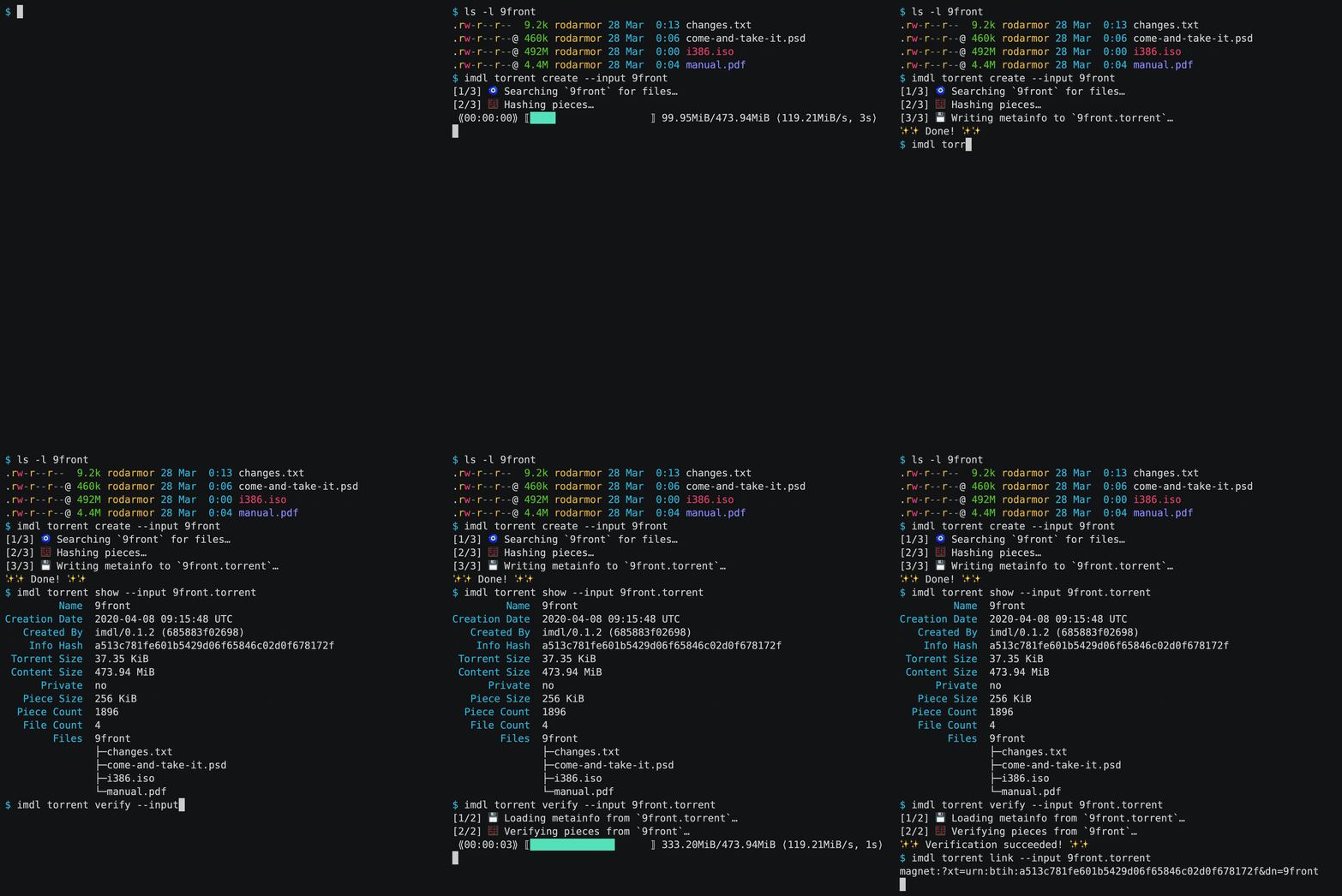
It has lots of features and niceties, is easy to install and run, and is
hopefully just the beginning of an ambitious project to make
decentralized content sharing better.
Features include:
- Attractive progress bars that display hashing throughput.
- Automatic piece length picker that uses the size of the torrent to
pick a good piece length.
- Ignores junk files, like
.DS_Store, by default.
- Detailed error messages.
- Warnings for common issues, like non power-of-two piece lengths.
- Support for all commonly used metadata fields, like
info.source and
info.private.
- File inclusion and exclusion with
--glob PATTERN and
--glob !PATTERN.
- Torrent verification with
imdl torrent verify.
- Torrent display with
imdl torrent show.
You can install the latest version of imdl to ~/bin with:
curl --proto '=https' --tlsv1.2 -sSf https://imdl.io/install.sh | bash
Development is hosted on GitHub,
where you can find the code, the issue tracker, and more installation
options.
Give it a try and let me know what you think!
I'm eager to hear what works, what doesn't, and what features you'd like
to see added. I'll be working on novel functionality—more on that
below—and I'd love to hear your critical feedback and ideas.
You can get in touch by
open an issue, joining
the discord server, or
sending me an email.
Happy sharing!
I am not a lawyer. This is not legal advice.
Popcorn Time-style video streaming apps seem to be vulnerable to legal
action by rightsholders.
For example, the
popcorntime.sh domain was recently suspended,
and the operator of a site which merely provided information about how to obtain and use Popcorn Time was sentenced to prison.
Although given that Popcorn Time's servers do not themselves host
infringing content this may seem a bit unfair, it is simply the reality
of the world we live in.
It is interesting to note, however, that although web browsers can be
used in exactly the same way as Popcorn Time, namely searching for and
viewing copyrighted movies, the developers of web browsers have thus far
not faced successful legal challenges.
Computering is a party. The stack is best visualized as a bunch of Jenga
blocks on the floor, and the heap as a bunch of balloons floating
around bumping into each other on the ceiling. The fact that the stack
usually grows downwards in memory is a travesty.
I've often been asked for suggestions for an appropriate first project in Rust, and I think that writing a version of a unix utility is a great choice, for a bunch of reasons!
- There is a diverse and colorful cast of characters to choose from that all provide an appropriate scope and difficulty level, such as:
tree: Print a graphical representation tree in visual formstrings: Extract plaintext strings from binary fileswc: Count the lines, characters, and bytes in a filels: List the contents of a directorync: Read and write bytes to network socketscal: Print a cute text calendarcat: Copy streams to stdoutcut: Extract delimited fields from linewise text recordssort: Sort linesuniq: Print only unique lines
-
obtain
Rustup is the rust toolchain manager. It can install Rust and keep it up-to-date.
-
write
Visual Studio Code is easy to use and has great Rust integration.
-
read
The Rust Book is a comprehensive guide to the entire language.
-
play
The Rust Playground allows you to quickly try out and share code snippets.
-
exercise
Rustlings are bite-sized exercises for learning rust.
-
chat
The Rust-Lang discord instance is a great place to chat about rust.
I only program in PL/I because I'm BASED.
Programs first crawled from the murky oceans as simple lists of instructions that executed in sequence. From these humble beginnings they have since evolved an astonishing number of ways of delinearizing.
In fact, most programming paradigms simply amount to different ways to transform a linear source file into a program with nonlinear behavior.
Some examples:
- gotos that unconditionally jump to another point in the program
- an abort instruction that stops the program at some point other than the end
- a macro facility that substitutes one instruction for one or more other instructions
- a source file concatenation facility that concatenates multiple source files
- an include directive that is substituted for the contents of a source file
- structured repetition and selection, a la for, while, if, and switch
- subroutines and functions
- array oriented programming that replace explicit repetition with implicit repetition
- first class functions which delegation of behavior to the caller
- object oriented programming with dynamic dispatch, which allow the runtime type of an object to determine which instructions to execute
- aspect oriented programming, pattern matching against the structure of the call stack to execute instructions when functions are called or return
- event driven programming, executing instructions in response to external events
- declarative programming, which essentially delegates execution of one program to another
Parse structure from the languageless void.